Lab 8: SLA Dynamic rApp
In this lab, you will deploy a 5G Standalone (SA) network using the OpenAirInterface (OAI) RF Simulator for the gNB and the OAI minimal 5G Core (5GC).
In the second phase of the experiment, you will deploy a pre-packaged SLA Dynamic rApp on the MX-PDK cluster using a DynamicrApp manifest. Unlike the rApp script from the previous labs, this rApp ships with a built-in user interface that lets you dynamically create and manage SLA policies at runtime. These policies are sent to the Non-RT RIC via the R1 interface, forwarded to the Near-RT RIC over the A1 interface, and ultimately enforced at the gNB by a corresponding xApp over the E2 interface.
open-ran.yaml
apiVersion: athena.trirematics.io/v1
kind: Network
metadata:
    name: oran
    namespace: trirematics
spec:
    slices:
        - plmn: "00101"
          dnn: internet
          network-mode: IPv4
          service-type: 1
          differentiator: 0x000001
          ipv4-range: "12.1.1.0/24"
          ipv6-range: "2001:1:2::/64"
    access:
        - name: oai-gnb
          stack: 5g-sa
          model: oai-ran/monolithic-gnb
          radio:
              device: rf-sim
          identity:
              an-id: 10
              tracking-area: 1
          cells:
              - band: n78
                arfcn: 641280
                bandwidth: 40MHz
                subcarrier-spacing: 30kHz
                tdd-config:
                    period: 5000
                    dl-slots: 7
                    dl-symbols: 6
                    ul-slots: 2
                    ul-symbols: 4
          core-networks:
              - oai-5gc.oran
          controller: ric.oran
    core:
        - name: oai-5gc
          stack: 5g-sa
          model: oai-cn/minimal
          identity:
              region: 0
              cn-group: 4
              cn-id: 5
    edge:
        - name: ric
          stack: 5g-sa
          model: mosaic5g/flexric
    dns:
        ipv4:
            default: 8.8.8.8
            secondary: 8.8.4.4
---
apiVersion: athena.trirematics.io/v1
kind: Terminal
metadata:
    name: ue1
    namespace: trirematics
spec:
    vendor: oai
    stack: 5g-sa
    model: terminal/oai-ue
    preferred-access: oai-gnb.oran
    target-cores:
        - oai-5gc.oran
    identity:
        imsi: "001010000000001"
        pin: "1234"
        opc: "0xc42449363bbad02b66d16bc975d77cc1"
        key: "0xfec86ba6eb707ed08905757b1bb44b8f"
        sqn: "0xff9bb4000001"
    slice:
        dnn: internet
        network-mode: IPv4
        service-type: 1
        differentiator: 0x000001
    radio:
        device: rf-sim
        formation: "1x1"
        bands:
            - n78
    readiness-check:
        method: ping
        target: google-ip
        interface-name: oaitun_ue1
Network Deployment
Deploy the network using the following command:
brc install network open-ran.yaml
The open-ran.yaml file does not include the xApp or the rApp. The rApp is deployed separately in the next section, and the xApp is deployed automatically by the SMO once the Non-RT RIC receives the first SLA policy.
Check the status of the deployment using brc observe and wait until all Elements reach the 1/1 Y state.
Run the following command to measure the UE’s downlink throughput before any SLA enforcement is active:
brc test throughput ue1 dl gateway -- -t 60
SLA Dynamic rApp Deployment
The rApp is defined as a DynamicrApp resource, which references a pre-built model image. The cluster pulls and runs the image, exposing the rApp’s user interface automatically.
sla-dynrapp.yaml
apiVersion: odin.trirematics.io/v1
kind: DynamicrApp
metadata:
  name: sla-rapp
  namespace: trirematics
spec:
  model: bubbleran/sla-rapp
---
apiVersion: v1
kind: Service
metadata:
  name: sla-dynrapp-svc
  namespace: trirematics
spec:
  selector:
    odin.t9s.io/rapp: sla-rapp
  ports:
    - name: http
      port: 9900
      targetPort: 9900
      nodePort: 30990
  type: NodePort
Deploy the rApp using the following command:
brc install rapp sla-dynrapp.yaml
If the deployment fails with an error such as provided port 30990 is already allocated, the requested nodePort is already in use on the cluster. Edit the nodePort field in sla-dynrapp.yaml, set it to a free port within the 30000–32767 range (e.g., 30991), and redeploy the rApp.
Check the status with brc observe. You should see a new element named sla-rapp.sla-rapp.dynrapp appear in the list of deployed elements. Wait until it reaches the 1/1 Y state before proceeding. You can also find sla-rapp in the list of deployed rApps.
Open the rApp’s user interface in your browser. The rApp is exposed via a NodePort service on port 30990, so navigate to http://<node-ip>:30990 to access the interface. If you changed the nodePort in the previous step, use that port instead.
The SLA Control Panel lets you define a policy by specifying the target Near-RT RIC, the slice identifiers (SST and SD), and the requested downlink bandwidth. Click Apply Policy to push the policy to the Non-RT RIC over the R1 interface. You can check the status of the policy with brc observe in the rApp jobs tab, where it should show as Running.
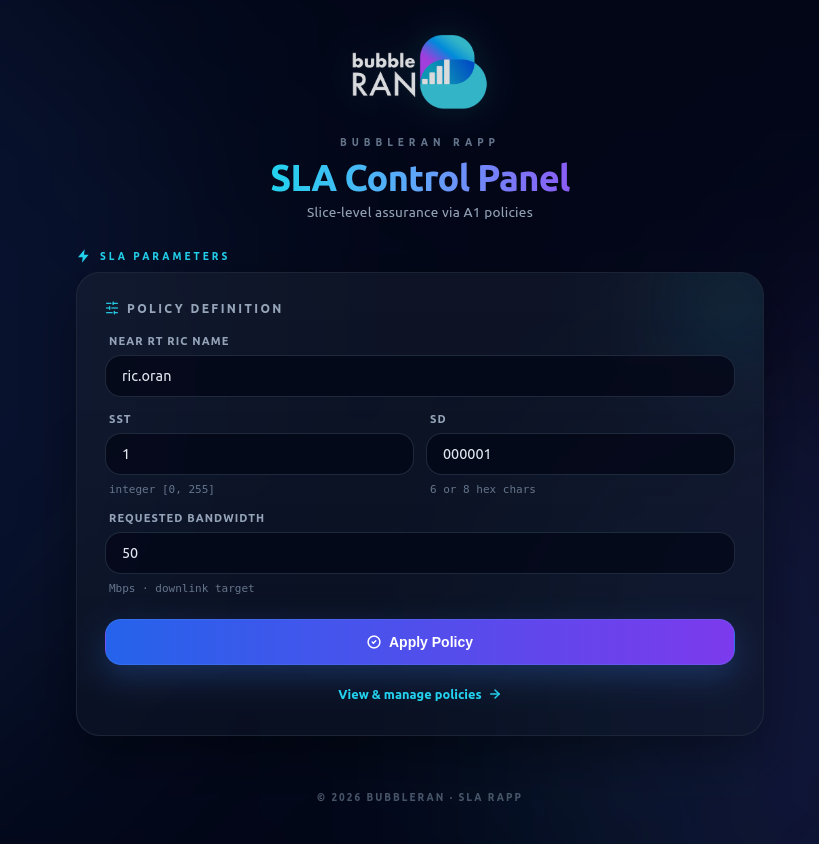
After the policy is applied, the SMO automatically deploys the corresponding xApp on the cluster. You can check the status of the xApp deployment with brc observe. Wait until it reaches the 1/1 Y state before proceeding.
The xApp maintains a control loop with the gNB over the E2 interface. The gNB periodically sends KPM Indication messages to the Near-RT RIC, and the xApp adjusts the Physical Resource Block (PRB) allocation via RC Control requests if the measured throughput deviates from the policy target.
Once the xApp is running, measure the UE’s downlink throughput again to observe the effect of SLA enforcement:
brc test throughput ue1 dl gateway -- -t 60
Uninstall
Remove the network and all associated resources with the following command:
brc remove network open-ran.yaml
brc remove policyjob <policy-job name> # 1000001
brc remove rapp sla-dynrapp.yaml
Verify with brc observe that all Elements and rApp jobs have been removed.
💬 Questions
- What is the difference in the roles of the xApp and rApp in this experiment?
- How does the
DynamicrAppmanifest approach (used in this lab) differ from the Python rApp script used in Lab 1? What are the trade-offs in terms of flexibility, ease of deployment, and customizability? - In the
brc observeoutput, what do thePRODUCEDandRBACcolumns represent, and what do they tell you about the rApp? - Draw the message flow, starting from the rApp, through the Non-RT RIC, Near-RT RIC, xApp, and down to the RAN.