
🏷️ Price on Request | Packages + Tiers
🔹 Built for operations teams, network engineering, and automation programs 🔹
Contact us for a tailored scope (data sources, domains, governance, rollout plan).





Opti-Sphere is designed to help you operate and optimize your 4G/5G networks. It introduces three layers: Data, Insight, and intelligent workflow, and seamlessly integrates with existing EMS/NMS/SMO/RIC/RAN/Core environments through available APIs, transforms operational data into traceable insights, and produces governed recommendations and change plans for your network operations and optimization with an audit trail. In Opti-Sphere automation is policy-controlled as follows:
- Recommend-only: ranked recommendations, no execution
- Human-approve: approval-ready plans & audit trail
- Bounded closed-loop: autonomous execution within guardrails & monitoring/rollback rules
Opti-Sphere is an ideal solution for private and public 5G networks with spatio-temporal variability.
▶️ Watch a demo | 📄 Request Opti-Sphere Datasheet | 📑 Request Opti-Sphere Customer Document | 🗓️ Book a meeting
At a glance
| Category | What you get |
|---|---|
| Outcome | Traceable insights, governed recommendations & change plans |
| Where it connects | EMS / NMS / SMO / RIC / RAN / Core (via available APIs) |
| Outputs | Dashboards, reports, APIs, recommendations, change plans, expected-impact estimates, audit trail |
| Automation modes | Recommend-only • Human-approve • Optional bounded closed-loop |
| Deployment | Customer-hosted (on-prem / private cloud / edge) or managed service / API model |
What customers achieve
- Faster, consistent operations decisions with explainable evidence and confidence indicators
- Higher availability and SLA/SLE assurance via early warning, forecasting signals, and RCA guidance
- Lower-risk change management with approval-ready rollout plans, canary/staged deployment, and rollback triggers
- Operational savings at scale through governed automation and repeatable workflows
- Energy-aware operations where energy/sustainability telemetry is available (power/energy/CO₂ tagging and exports)
Reference architecture
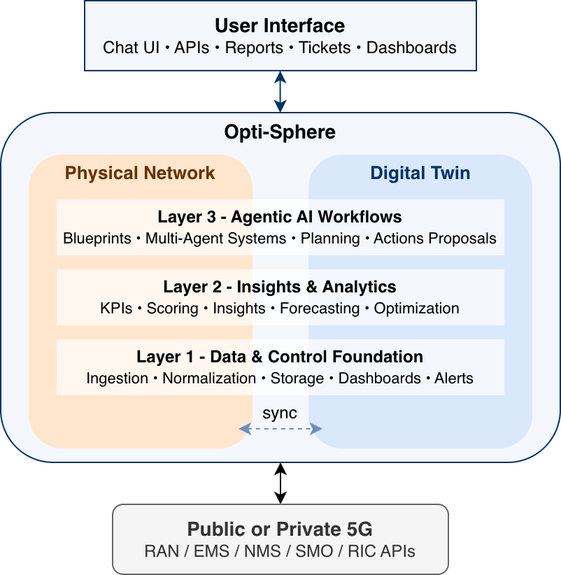
Opti-Sphere deploys incrementally as three modular layers (L1–L3) plus an optional Digital Twin spanning all layers.
What is included
Layer 1 (L1) — Data (Sense)
Purpose: make operational data consistent, queryable, and auditable across vendors and domains.
Included
- Multi-source ingestion: KPIs/counters, logs, traces, alarms/events, configuration snapshots, topology/context, infrastructure/resource telemetry (CPU/GPU, memory, storage, network), plus energy/sustainability signals (where available)
- Normalization & schema management: entity identifiers, units, time alignment, enrichment
- Time-series optimized storage and querying: retention policies, downsampling/rollups
- Dashboards & threshold alerts for KPIs/KQIs
- Exports & governance: dataset export APIs (REST/gRPC where applicable), RBAC, lineage/audit metadata, data quality checks
Customer benefit: one trustworthy operational dataset across domains and faster triage/troubleshooting.
Layer 2 (L2) — Insights & Analytics (Infer)
Purpose: produce explainable, decision-ready signals (formulas first, models second).
Included
- Baselines & scoring per KPI/KQI (with confidence)
- Correlation & RCA candidate ranking with evidence summaries
- Trend/seasonality & anomaly indicators (statistical and ML where enabled)
- Forecasting signals (traffic, risk, degradation likelihood)
- Optimization primitives: objectives, constraints, feasibility checks, what-if scoring hooks
Customer benefit: less noise, better prioritization, faster mitigation.
Layer 3 (L3) — Agentic AI & Decision Support (Automate)
Purpose: turn intent and constraints into governed, repeatable workflows that produce auditable recommendations and change plans.
Included
- Blueprint catalog (configurable multi-agent workflows) with intent-to-task translation
- Decision narrative & structured outputs: recommended actions, expected impact, confidence, evidence links
- Tool integrations: analytics/optimization engines, Digital Twin validation, change management systems
- Governed execution modes: recommend-only, human-approve, optional bounded closed-loop
- Policy guardrails: allowed actions, evidence thresholds, approval gates, rollback hooks
Blueprint examples (tier-dependent)
- Config Planner (propose/validate configuration deltas with rollout plans)
- Observability Copilot (guided exploration of KPIs/alarms/context with traceability)
- SLA/SLE Assurance (detect degradations, quantify impact, propose mitigations under constraints)
- Anomaly Detection & RCA (early warning, evidence collection, RCA hypotheses, next steps)
Optional: Digital Twin — Validation & What‑If (Twin add-on)
Purpose: reduce operational risk by validating candidate changes before production actions.
Included
- Synced representation of topology/config/state (where integration allows)
- What-if evaluation: expected KPI/KQI deltas, risk scoring, constraint feasibility
- Controlled trials & rollout planning (canary/staged deployments)
- Optional synthetic scenarios for rare faults/stress conditions (when enabled)
Customer benefit: safer changes—test first, deploy with confidence, and rollback faster.
Example blueprint: multi-agent cell reconfiguration
This blueprint illustrates a governed workflow for proposing, validating, and refining cell configuration changes:
- Cell Reconfiguration Planner (Reconfig) proposes candidate configuration deltas and a rollout plan.
- Digital Twin Validator (DT) evaluates candidates with what-if analysis and safety checks.
- Physical Network Optimization Agent (PHY) refines and enforces the configuration within constraints.
- Flexible LLM placement supports cloud, edge, or AI factory deployments depending on latency, privacy, and compute constraints.
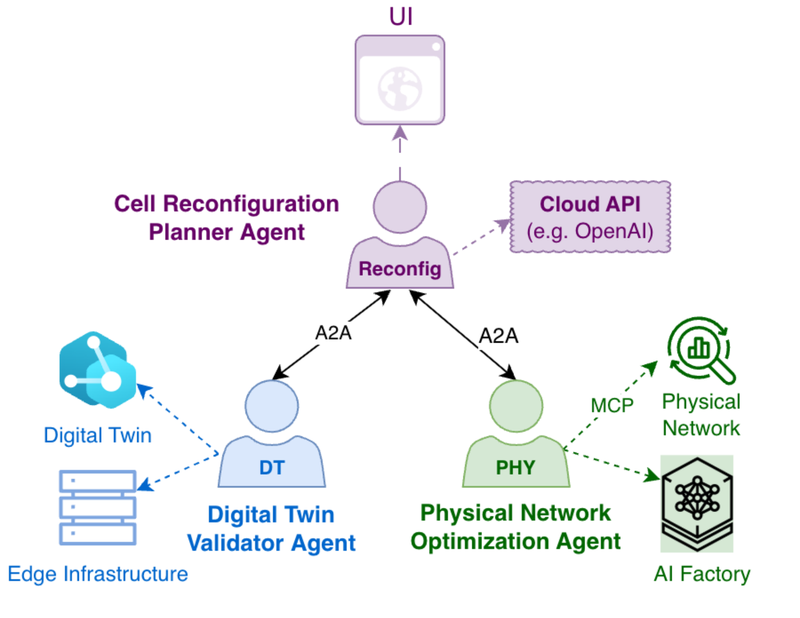
Checkout sample multi-agent blueprint for governed configuration planning and validation here
Interfaces & integration
Opti-Sphere integrates via northbound and southbound interfaces; exact protocols depend on your environment.
Northbound (outputs & control)
- UI for dashboards, recommendations, and workflow approvals
- APIs for queries, reports, and exporting structured recommendations/action plans (REST/gRPC; webhooks/SDK where applicable)
- Optional integration with ticketing/change-management systems for approvals and audit
Southbound (data in / actions out)
- Data ingestion via streaming or batch: Kafka/MQTT, Prometheus/OpenTelemetry, REST/gRPC, syslog/SFTP, NETCONF/YANG, O‑RAN O1 (when applicable)
- Action outputs (optional, governed): configuration deltas, policy updates, workflow triggers, or change requests via EMS/NMS/SMO/RIC/vendor APIs
Deployment and Operational Modes
Opti-sphere could be either hosted on-permises or developer as a service with API models. It can operate in three modes as defined in the table below.
| Operation | What it means |
|---|---|
| Recommend-only | Insights and ranked recommendations; no changes executed |
| Human-approve | Approval-ready change plans & audit trail; execution only after explicit approval |
| Closed-loop (optional) | Autonomous execution of bounded actions within policy & continuous monitoring and rollback rules |
Packaging & tiers
| Package | Layers | Included (default) | Typical outcome |
|---|---|---|---|
| Sense | L1 | Ingestion, normalization, dashboards, threshold alerts, dataset export, data quality checks | Single source of truth for ops telemetry |
| Infer | L1+L2 | Baselines/scoring, trends/correlations, anomaly indicators, forecasting signals, optimization primitives | Faster RCA & proactive operations |
| Automate | L1+L2+L3 | Blueprint catalog, agentic workflows, governed execution modes, structured action plans, policy guardrails | Industrial-scale governed automation |
| Twin (add-on) | Digital Twin | What-if evaluation, risk scoring, rollout planning, optional sync hooks | Lower-risk changes, higher success rate |
Ready to start?
Recommended rollout
- Start with Sense (L1) to unify telemetry and build trust in the data.
- Add Infer (L2) for explainable signals: baselines, anomalies, forecasts, and feasibility checks.
- Enable Automate (L3) for governed workflows and approval-ready change plans.
- Add Twin where high accuracy, risk reduction and what‑if validation are critical.
# Illustrative workflow (adapt to your environment and chosen tier)
bash$ brc connect sources --kpis --events --cm --topology
bash$ brc enable tier sense
bash$ brc enable tier infer        # optional
bash$ brc enable tier automate        # optional
bash$ brc install aifabric blueprint.yaml        # optional
Need more information ?
Check our frequently asked questions about Opti-Sphere here below and get quick replies.
To answer your unique deployment and projects needs, we can plan a live demo, help you forward with a requirements questionnaire, and connect you with our partner ecosystem (universities, system integrators, cloud providers).